
Pay@ Gateway review 2026: fees, payment methods and who it is for
Pay@ has moved bill and account payments through South African tills, banking apps and wallets since 2007. Its online gateway brings that network to your checkout: 2.85% on cards, 1.95% on EFT and Capitec Pay, no monthly fee, and, coming soon, something almost no other gateway can offer: letting customers pay for an online order in cash at thousands of stores. We tested it and ran it through the same maths we use for every gateway.
Our verdict
4.5 / 5
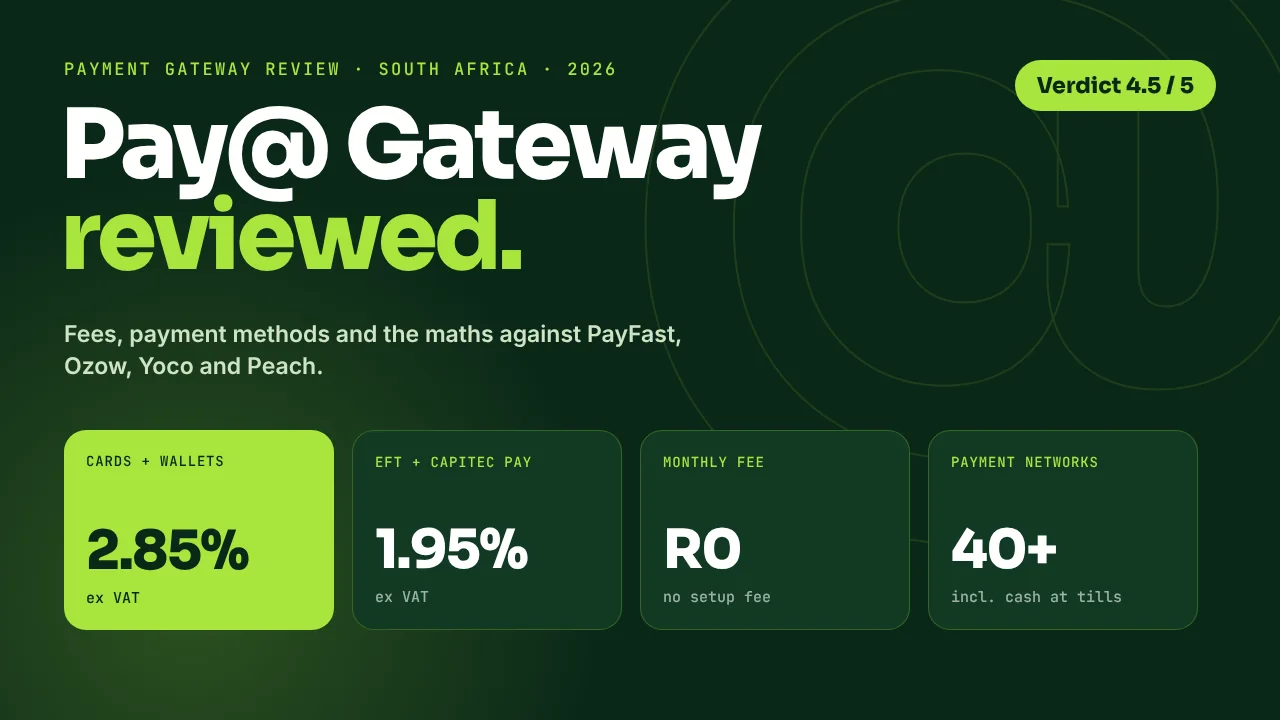
The best gateway in South Africa for reaching every shopper, not just the ones with a credit card. Pay@ combines a sharp 2.85% card rate and no fixed fees with something no mainstream rival offers: customers will soon be able to pay for an online order in cash at Shoprite, Checkers, Pick n Pay, Spar, PEP and many more tills. On our standard R200,000-a-month test store it is the second-cheapest published-rate gateway in South Africa, about R990 a month cheaper than PayFast.
Add one consolidated settlement, reconciliation built in, Capitec Pay, every major wallet and buy now, pay later on the way, and it is our top pick for WooCommerce stores selling to a broad South African market.
How we tested: we set Pay@ Gateway up on a WooCommerce store through the official plugin and put payments through the checkout across cards, wallets and EFT, then checked order status updates, refunds and reconciliation in the dashboard. Fees and features below come from our testing and Pay@’s published pricing as of October 2026. Pay@ did not pay for this review.
Pay@ Gateway at a glance
| What | Pay@ Gateway |
|---|---|
| Card fee | 2.85% ex VAT (Visa, Mastercard, Amex, Apple Pay, Google Pay, Samsung Pay, in-app) |
| EFT / bank fee | 1.95% ex VAT (Pay with EFT, Capitec Pay) |
| Minimum per transaction | R1.85 ex VAT |
| Setup / monthly | R0 / R0 |
| Charged on | Successful payments only |
| Cash in store | Coming soon: R6.50 + 0.5% ex VAT, for SMEs and Enterprise merchants |
| Buy now, pay later | Coming soon |
| Settlement | T+2, one consolidated settlement, reconciliation included |
| Platforms | WooCommerce plugin, API (payment links or embedded checkout), more plugins launching |
| Go-live | From 24 hours to two weeks (plugin), 1 to 8 weeks (custom API) |
| Regulation | Authorised FSP 29423, certified TPPP, ISO/IEC 27001, B-BBEE |
What Pay@ is (and why you already know the name)
Most South Africans have used Pay@ without thinking about it. It is the network behind “pay your account at any till” on municipal bills, insurance premiums, school fees and retail accounts. Founded in 2007 in Stellenbosch, Pay@ now connects businesses to more than 40 payment networks: retailers such as Shoprite, Checkers, Usave, Pick n Pay, Spar, PEP, Ackermans, Boxer, Game, Makro and Builders; banking apps from Capitec, FNB, Nedbank, Absa, Standard Bank and TymeBank; and wallets including Apple Pay, Samsung Pay, Google Pay, Zapper, SnapScan, Scan to Pay, MoMo and VodaPay.
In February 2026 JSE-listed Araxi announced it would acquire 80% of Pay@ Holdings in a deal valuing the business at around R1 billion. Pay@ reported revenue of R271.2 million for the year to February 2025, up 26.5%, with net profit of R91.3 million. For a merchant choosing a gateway, that matters: you are plugging into a profitable, growing payments business with almost two decades of track record, not a start-up.
Pay@ Gateway brings that network to online stores: one checkout for cards, wallets, instant EFT, Capitec Pay and, soon, cash at the till.
Pay@ Gateway fees in full
Pricing is simple: a percentage on successful payments, no setup fee and no monthly fee. All rates are ex VAT.
| Payment method | Fee (ex VAT) | Fee incl. 15% VAT |
|---|---|---|
| Credit and debit cards (Visa, Mastercard, Amex) | 2.85% | 3.28% |
| Apple Pay, Google Pay, Samsung Pay, in-app | 2.85% | 3.28% |
| Pay with EFT (instant EFT) | 1.95% | 2.24% |
| Capitec Pay | 1.95% | 2.24% |
| Minimum fee per transaction | R1.85 | R2.13 |
| Cash in store (coming soon; SMEs and Enterprise) | R6.50 + 0.5% | R7.48 + 0.58% |
| Setup fee, monthly fee | R0 | R0 |
| Volume pricing (10,000+ transactions a month) | On request | – |
There is no per-transaction rand fee on top of the percentage, which is where Pay@ pulls ahead of PayFast (R2 per card payment) and Peach (R1.50 per payment). The R1.85 minimum only applies to card orders under about R65.
What a single order costs you on Pay@
| Order value | Card | EFT / Capitec Pay | Cash in store (coming soon) |
|---|---|---|---|
| R150 | R4.28 | R2.93 | R7.25 |
| R350 | R9.98 | R6.83 | R8.25 |
| R600 | R17.10 | R11.70 | R9.50 |
| R1,500 | R42.75 | R29.25 | R14.00 |
| R5,000 | R142.50 | R97.50 | R31.50 |
Look at the cash column. Once pay in store launches, at R6.50 + 0.5% it gets cheaper than a card payment from about R280 and cheaper than EFT from about R440. On a R1,500 order it costs R14 against R42.75 on a card. At most gateways the “alternative” payment method is the expensive one. With Pay@ it can be the cheapest.
How Pay@ compares with PayFast, Yoco, Peach, Ozow and Stitch
Here are the published rates side by side, using the same sources as our full cost comparison, with Pay@ added.
| Gateway | Cards | EFT / bank | Per-txn fee | Cash at retail tills |
|---|---|---|---|---|
| Pay@ | 2.85% | 1.95% | None | Coming soon |
| PayFast | 3.2% + R2 | 2.0% (min R2) | R2 on cards | No |
| Yoco | 2.55–2.95% | 2.0% | None | No |
| Peach Payments | 2.95% + R1.50 | 1.5% + R1.50 | R1.50 | No |
| Ozow | 2.85% (tiered) | 1.5% (min R1) | None | Vouchers only |
| Stitch Express | 2.95% | 2.0% (Capitec Pay) | R2 payout | No |
What R200,000 a month in sales costs you in gateway fees
Monthly total, ex VAT. 333 orders at R600, 70% card / 30% EFT. Lower is better.
Pay@: R140,000 cards x 2.85% = R3,990, plus R60,000 EFT x 1.95% = R1,170. Other gateways: see our cheapest payment gateway breakdown.
On this store Pay@ saves about R986 a month (R11,832 a year) against PayFast and beats Yoco, Stitch Express and Peach. Its card rate matches the lowest published entry rate in the country and undercuts the 2.95% that Yoco, Peach and Stitch charge at entry level.
Small baskets: the fee on one R150 card order
Ex VAT. No per-transaction rand fee keeps Pay@ at the front for everyday order values.
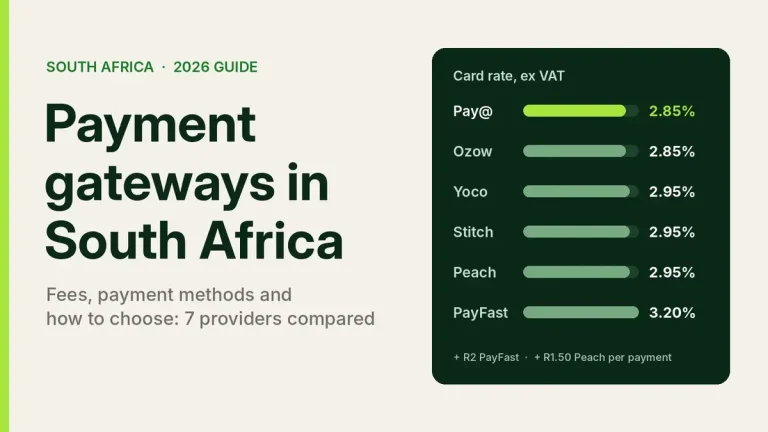
Entry-level published card rates. PayFast 3.2% + R2; Peach 2.95% + R1.50; Yoco and Stitch 2.95%; Ozow and Pay@ 2.85%.
Want to run your own order mix? Our Payment Gateway Comparator does the same calculation with your numbers.
Payment methods: every way South Africans pay
| Method | Pay@ | Notes |
|---|---|---|
| Visa, Mastercard, Amex | Yes | 3D Secure |
| Apple Pay, Google Pay, Samsung Pay | Yes | Same 2.85% as cards |
| Instant EFT (“Pay with EFT”) | Yes | 1.95% |
| Capitec Pay | Yes | 1.95%; reaches SA’s largest retail bank customer base |
| Banking apps (Capitec, FNB, Nedbank and more) | Yes | Customers pay with a Pay@ reference in the app they already use |
| Scan to Pay, SnapScan, Zapper | Yes | QR wallets |
| Cash at retail tills | Coming soon | R6.50 + 0.5%; Shoprite, Checkers, Pick n Pay, Spar, PEP, Makro and more |
| Buy now, pay later | Coming soon | Pay@ is adding BNPL to the gateway |
| Vouchers | Coming soon | OneVoucher, OTT and Flexi already run on the Pay@ bill-pay network |
That is one of the widest method lists in the market, and the only one set to pair online payments with a retail cash network of this size. If you need BNPL today, you can run a provider such as Payflex or PayJustNow alongside Pay@ until the native option launches; our BNPL guide compares them.
Cash in store: the feature nobody else has (coming soon)
This is what will make Pay@ different. Pay in store is listed on the Pay@ Gateway page as coming soon, and it will be open to SMEs as well as large merchants. Here is how it will work.
The customer chooses “pay in store” and gets a Pay@ reference or barcode.
They pay cash at a participating retailer such as Shoprite, Pick n Pay, PEP or Spar.
Pay@ validates the payment and notifies your store, so the order is marked paid.
The money lands in the same single settlement as your card and EFT payments.
Why it matters: millions of South African adults do not shop online with a card. Some are unbanked or underbanked; many more do not trust typing card details into a website. For them, a checkout with only card and EFT is a dead end. Pay@ will turn those visitors into customers, using the same tills they already pay their municipal and store-account bills at.
It suits stores selling school uniforms and stationery, homeware, entry-level fashion, education and course fees, event tickets, prepaid products and anything aimed at customers in townships and smaller towns. In short, any store where “I don’t have a card” is a reason checkouts get abandoned.
More than a checkout: Pay@ bill payments and invoicing
The gateway sits on top of Pay@’s core business: collecting bill and account payments for South African companies since 2007. If your business sends invoices, statements or account bills, not only online orders, Pay@ gives you three more tools.
Invoices and payment requests
A self-service portal with no integration. Send pre-populated invoices and payment requests by SMS, email or QR code. Invoices switch from SENT to PAID automatically, and you can bulk-upload month-end statements. No monthly subscription.
Bill payments for billers
One API connects your accounts to 40+ payment networks. Bills can be presented by printed invoice, PDF, SMS, QR code, payment link, in-app, web or USSD. Real-time validation checks the account and amount before a payment goes through.
White-label payments
Pay@’s platform-as-a-service lets you launch payment requests and invoicing under your own brand, with no build required.
99.995% reconciled
Pay@ reports a 99.995% reconciliation rate across its network, with daily reports, one settlement for all payments and funds allocated automatically to the right account.
For a store that also invoices trade customers, collects deposits or runs accounts, this is a real advantage: online orders, invoices and account payments can all come in through one provider and one settlement. That pairs well with a WooCommerce B2B and wholesale setup.
| Pay@ Go channel | Published fee (ex VAT) |
|---|---|
| Online (card, EFT, wallets) | 2.85% (min R1.85) |
| In-app (Capitec, FNB, Nedbank) | 2.85% (min R5.00) |
| In-store at selected retailers | 3.50% (min R7.00) |
| Monthly subscription | None |
Settlement and reconciliation
The gateway settles on T+2, and every payment method arrives as one consolidated settlement with reconciliation included. In practice this is one of Pay@’s strongest admin features. Many SA stores run PayFast for cards and Ozow for EFT and end up matching two payout streams, two sets of fees and two dashboards every month. With Pay@, cards, wallets, EFT, Capitec Pay and, once it launches, cash all land in one place, matched to orders by webhook.
The dashboard shows success rates by payment method and supports full and partial refunds. Before you go live, confirm your payout schedule and refund terms with the onboarding team so your cash-flow planning is set from day one.
Setting it up on WooCommerce
Pay@ has a WooCommerce plugin for self-service merchants and an API with payment links or embedded checkout for custom builds. In our test, setup was straightforward: install, add your Merchant ID, check the webhook, go live. More platform plugins are launching; until a Shopify app is available, Shopify merchants can use Pay@ payment links, and our Shopify payments guide covers the current app options.
- Create a Pay@ Go account and complete KYC: company registration, director ID, proof of address and a bank confirmation letter.
- Test in the sandbox. Run a card, an EFT and a refund before you switch on live payments.
- Install the WooCommerce plugin and enter your Merchant ID and keys.
- Check the webhook. Place a low-value live order and confirm WooCommerce moves it to “Processing” on its own.
- Go live. Plugin merchants can be live within 24 hours to two weeks once KYC clears.
For how Pay@ fits alongside other options, see WooCommerce payment gateways in South Africa.
Security and compliance
| Item | Pay@ | What it means for you |
|---|---|---|
| 3D Secure | Yes | Card liability shifts to the bank on authenticated payments |
| Fraud monitoring | Rules-based, BIN-pattern and velocity checks | Card-testing and fraud patterns are flagged automatically |
| Card data on your site | No (hosted checkout) | Your PCI scope stays small |
| Card processing | PCI DSS certified processing partners | Card data is handled by certified processors |
| ISO/IEC 27001 | Yes (BSI) | Audited information-security management |
| Regulation | Authorised FSP No. 29423, certified TPPP | A regulated third-party payment provider |
Scores by category
Overall: 4.5 / 5. Pay@ scores top marks for payment reach and cash, and strongly on price and reconciliation. Platform support is the one area still growing, and new plugins are on the way.
Pros and things to know
Pros
- 2.85% cards with no per-transaction rand fee: joint-lowest published entry card rate in SA
- No setup or monthly fee; you only pay on successful payments
- Cash at retail tills coming soon for SMEs and Enterprise, a feature no mainstream rival offers
- 40+ payment networks: cards, wallets, Capitec Pay, banking apps, QR and cash
- One consolidated settlement with reconciliation built in
- Bill payments, invoicing and white-label tools from the same provider
- Regulated FSP, ISO 27001 and almost two decades in SA payments
Things to know
- WooCommerce and API today; a Shopify app is not available yet
- Settlement is T+2
- For EFT-only stores, Ozow and Peach publish a lower EFT rate (1.5%)
- Cash in store, vouchers and BNPL are coming soon rather than live today
Who should use Pay@ Gateway
| Your store | Pay@ a good fit? | Why |
|---|---|---|
| WooCommerce store selling to a broad SA market | Yes, top pick | Cards, EFT, wallets and cash in one checkout |
| Customers without cards or who prefer cash | Yes, top pick | Cash at retail tills (coming soon) will turn them into buyers |
| Everyday baskets (R65–R500) | Yes | No per-transaction fee, unlike PayFast and Peach |
| Currently running two gateways | Yes | One settlement and one reconciliation instead of two |
| B2B, accounts or invoicing | Yes | Pay@ Go invoicing and bill payments alongside the checkout |
| High volume (10,000+ transactions a month) | Yes, talk to Enterprise | Volume pricing, integration team and account manager |
| Shopify store | Payment links for now | Shopify app not yet available |
Want Pay@ set up on your WooCommerce store? We install and test gateways on live transactions, including webhooks, refunds and order status. See our WooCommerce development services or get a quote within 24 hours.
How Pay@ stacks up against the alternatives
- vs PayFast: Pay@ is cheaper on cards (2.85% vs 3.2% + R2) and EFT (1.95% vs 2.0%), and adds cash at the till. PayFast has more platform plugins today.
- vs Ozow: same 2.85% card rate; Ozow is cheaper on EFT, while Pay@ adds retail cash and bill payments.
- vs Yoco: Pay@ beats Yoco’s 2.95% entry card rate and offers far more payment methods. Yoco suits stores that also need card machines.
- vs Peach Payments: no R1.50 per-transaction fee on Pay@, which makes it cheaper on everyday baskets. Peach is strong on subscriptions.
- vs Stitch Express: lower card rate on Pay@ and a much bigger cash network.
For every provider side by side, see our guide to payment gateways in South Africa. For the full numbers, read the cheapest payment gateway for South African stores and PayFast vs Ozow vs Peach vs PayGate.
Frequently asked questions
How much does Pay@ Gateway charge?
2.85% ex VAT on cards and digital wallets and 1.95% ex VAT on Pay with EFT and Capitec Pay, with a minimum of R1.85 per transaction. Cash in store, coming soon, is priced at R6.50 + 0.5%. There is no setup fee and no monthly fee, and you only pay on successful payments.
Can customers pay for an online order with cash using Pay@?
Soon. Pay in store is listed as coming soon on the Pay@ Gateway page. When it launches, the customer will get a Pay@ reference or barcode at checkout and pay cash at a participating retailer such as Shoprite, Pick n Pay, PEP or Spar, and your store is notified when the payment clears. It will be available to SMEs as well as Enterprise merchants.
Does Pay@ offer buy now, pay later?
BNPL is coming soon to Pay@ Gateway. Until it launches, you can run a BNPL provider alongside Pay@ at checkout.
Does Pay@ work with Shopify?
A Shopify app is not available yet; more plugins are launching. Shopify merchants can use Pay@ payment links in the meantime. WooCommerce has an official plugin today.
Is Pay@ cheaper than PayFast?
Yes, on published rates. Cards are 2.85% against PayFast’s 3.2% + R2, and EFT is 1.95% against 2.0%. On a R200,000-a-month store with a 70/30 card and EFT split, Pay@ costs about R5,160 a month against PayFast’s R6,146.
How fast does Pay@ settle?
T+2, as one consolidated settlement across all payment methods, with reconciliation included.
Is Pay@ safe and regulated?
Pay@ is an authorised financial services provider (FSP No. 29423), a certified third-party payment provider and ISO/IEC 27001 certified. Card payments use 3D Secure and are processed by PCI DSS certified partners, so card data never touches your website.
Can I use Pay@ to send invoices or collect bill payments?
Yes. Pay@ Go lets you send invoices and payment requests by SMS, email or QR code with no integration, and the Integrated solution lets billers collect account payments through 40+ retail, banking and digital networks.
The bottom line
Pay@ Gateway is one of the strongest payment options a South African online store can choose in 2026. The card rate is among the lowest in the country, there are no fixed fees, and one consolidated settlement keeps the books simple. Above all, it lets you sell to the whole South African market: card holders, EFT users, Capitec customers, wallet users and, once pay in store launches, the millions of shoppers who would rather pay cash at the till.
If you run WooCommerce, it is our top pick for stores selling to a broad SA audience. With BNPL and more platform plugins on the way, it is only going to get stronger. You can see the full offering and sign up on the Pay@ Gateway website.
Sources
- Pay@ Gateway: online payments (pricing, methods, onboarding, security), accessed October 2026
- Pay@: payment networks, retailers and billers
- Pay@ Go: invoicing and payment requests
- Pay@ Integrated solution for billers
- Yap: Pay@ white-label payments
- Araxi Limited: Category 1 announcement, acquisition of Pay@ Holdings (SENS, 18 February 2026)
- BusinessTech: South African payments company being bought for R1 billion
- Competitor rates: eCommerce Development, cheapest payment gateway for South African stores (each provider’s published fee page)

We have built 400+ online stores for South African businesses since 2014. Read more about WooCommerce development in South Africa.