How to get a payment gateway in South Africa: requirements, documents and how long it takes
Most gateway applications that stall do so for boring reasons: a proof of address that is four months old, a bank account in the wrong name, or a website with no refund policy. Here is exactly what South African gateways ask for, how long each one takes, and how to get approved first time.
The short answer
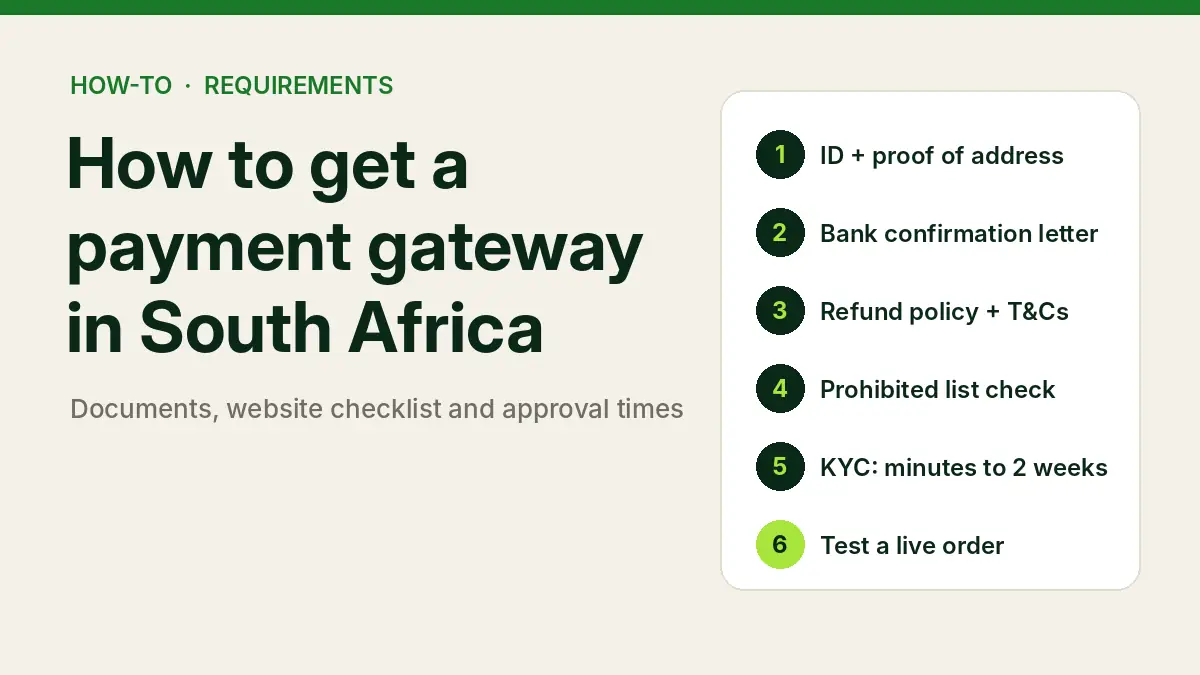
- Decide how you will sign up: individual, sole proprietor, company or non-profit.
- Gather ID, proof of address (under three months old), a bank confirmation letter and, for companies, CIPC documents.
- Make sure your website shows terms, a refund policy, product details and contact information.
- Check your products are not on the provider’s prohibited list.
- Apply and complete KYC: anything from minutes to two weeks.
- Install the plugin or app, test, and place one live low-value order.
For WooCommerce stores, Pay@ Gateway can be live in as little as 24 hours, KYC dependent, with no setup or monthly fee.
Still choosing a provider? Start with our guide to payment gateways in South Africa, or our pick of the best payment gateway for small businesses. Requirements below come from each provider’s own published pages, checked on 21 October 2026.
Step 1: decide how you will sign up
Not every gateway accepts every type of business. This is the first thing to check.
| Gateway | Individuals | Sole proprietors | (Pty) Ltd / CC | Non-profits |
|---|---|---|---|---|
| Pay@ (Pay@ Go) | Not stated | Yes | Yes | Not stated |
| PayFast | Payment requests | Yes (sole trader) | Yes | Yes |
| Yoco | Yes, SA residents 18+ | Not named | Yes, if registered in SA | Not named |
| Peach Payments | Not stated | Yes | Yes | Yes (NPC, NPO, trusts) |
| Ozow | Ozow.ME app instead | Informal merchant route | Yes | Not named |
| Stitch Express | No separate category | Yes | Yes | Yes (NPC) |
“Not stated” means the provider’s public pages do not say either way; ask during onboarding. Peach’s self-serve dashboard is aimed at businesses doing R100,000 to R1 million a month on Shopify, WooCommerce, Wix, Magento, Ecwid or Payment Links.
Step 2: gather your documents
The exact list varies by provider, but almost every South African gateway will ask for some version of this:
| You are a… | Usually needed |
|---|---|
| Individual or sole proprietor | SA ID (or passport), proof of address less than three months old, bank confirmation letter or recent bank statement. Peach also asks for evidence of the business name, such as an invoice or letterhead. |
| (Pty) Ltd | CIPC registration (CoR14.3 or CM1), IDs for directors, proof of business address, a bank account in the company’s name, and beneficial ownership details. |
| Close corporation (CC) | CK1 (and CK2 if applicable), IDs for members, proof of address, a bank account in the CC’s name. |
| Non-profit | NPO certificate from the Department of Social Development or NPC registration, ID or letter of authority for the signatory, a bank account in the organisation’s name. |
Details that trip people up
- Age of documents. Proof of address and bank documents generally need to be under three months old.
- Name match. The bank account must be in the name of the person or business applying. Peach accepts a sole proprietor’s personal or “trading as” account.
- What counts as proof. PayFast does not accept an invoice as proof of address or an internet-banking transaction statement as bank proof.
- ID type. Peach accepts an SA ID book or smart ID, not a driver’s licence, and runs a liveness check. Stitch also asks for a selfie and liveness check.
- Beneficial owners. Peach verifies owners of 5% or more; Stitch asks for IDs of shareholders holding 25% or more.
Pay@ does not publish a document list; its onboarding says only that go-live is KYC dependent and includes account verification checks, so have the standard set above ready.
Step 3: get your website ready for review
Gateways look at your site before approving you. Peach publishes the clearest checklist: a refund and return policy, terms and conditions, a product list or descriptions, and contact information, on a site that is publicly accessible and not password-protected. Ozow advises an operational website, and Stitch asks for your website during verification.
Even where a provider does not spell it out, these belong on every South African store anyway. The Electronic Communications and Transactions Act requires online sellers to show who they are, how to contact them, full prices and their returns policy, and POPIA requires a privacy policy. Our POPIA privacy policy guide covers that one.
Website checklist before you apply
- Business name, physical address, email and phone number
- Terms and conditions
- Returns and refund policy
- Delivery policy and times
- Privacy policy
- Real products or services with descriptions and prices in rand
- Site live, on HTTPS, and not behind a password or “coming soon” page
Step 4: check you are not in a prohibited category
Every gateway restricts some products. PayFast, Yoco and Peach publish their lists; examples include pyramid and MLM schemes, adult content, tobacco, illegal drugs, counterfeit goods and unlicensed gambling. PayFast does not process pre-orders, Yoco lists cannabis and CBD, and Peach does not currently accept drop-shipping businesses. If your category is borderline, ask before you apply rather than after you have integrated.
Step 5: apply and complete KYC
Here is how long each provider says approval takes once your documents are in:
| Gateway | Stated time to go live | Setup / monthly fee |
|---|---|---|
| Yoco | “Start accepting payments in minutes” | R0 / R0 |
| Ozow | 3 hours to 2 working days | R0 / R0 |
| Stitch Express | Verification within 1 business day | None listed |
| Pay@ Gateway | From 24 hours (plugin, KYC dependent); 24 hours to 2 weeks; API 1 to 8 weeks | R0 / R0 |
| PayFast | About 2 business days | R0 / R0 |
| Peach Payments | Risk check up to 48 hours after onboarding steps | R0 / R0 on Growth |
In practice, the time you lose is almost always on your side: chasing a fresh bank letter, re-uploading a blurry ID, or fixing the website. Have everything in one folder before you start.
Step 6: install, test and go live
- Install the plugin or app. WooCommerce: install the provider’s plugin and enter your merchant credentials. Shopify: install the provider’s app from the Shopify App Store. No website: create a payment link instead.
- Test in sandbox. Run a successful, a declined and an abandoned payment, plus a refund.
- Check the callback. Place a real low-value order and confirm the order moves to paid on its own. Our WooCommerce payment gateway guide explains why this is the step that breaks.
- Confirm settlement. Check the money arrives in your bank account on the schedule you were promised.
Why gateway applications get delayed
- Proof of address or bank letter older than three months
- Bank account name does not match the applicant
- Website still under construction or password-protected
- No refund policy or contact details on the site
- A director or beneficial owner has not completed verification
- The business is in a restricted or prohibited category
Do you need to register with PASA?
No, not as an ordinary online store. The Payments Association of South Africa requires anyone who accepts payments from multiple parties on behalf of clients to register as a third-party payment provider (TPPP) through a sponsoring bank. Your gateway is the TPPP; you are its merchant. You only need to think about TPPP registration if you plan to collect money on behalf of other businesses, for example by running a marketplace that takes payments for third-party sellers.
Want us to handle it? We prepare stores for gateway review, install the plugin or app, and test it on live transactions. See our WooCommerce and Shopify services or get a quote within 24 hours.
FAQs
What documents do I need for a payment gateway in South Africa?
Typically an SA ID, proof of address less than three months old and a bank confirmation letter. Companies add CIPC registration documents, directors’ IDs and beneficial ownership details; CCs add a CK1; non-profits add an NPO or NPC certificate.
Can I get a payment gateway without a registered company?
Yes. PayFast, Peach, Stitch Express and Pay@ Go accept sole proprietors, Yoco accepts South African individuals aged 18 or older, and Ozow has an informal-merchant route.
How long does it take to get a payment gateway?
From minutes (Yoco) to about two business days (PayFast) for most providers once documents are in. Pay@’s WooCommerce plugin can be live from 24 hours, KYC dependent. Custom API integrations take one to eight weeks.
Do I need a website to get a payment gateway?
Not always. Yoco, PayFast, Peach and Ozow offer payment links, and Pay@ Go sends invoices and payment requests with a link or QR code. If you do have a website, it needs terms, a refund policy and contact details before review.
Does it cost anything to apply?
None of the entry plans covered here charges a setup or monthly fee. You pay a percentage on each successful payment.
Why was my payment gateway application rejected?
The usual causes are documents older than three months, a bank account in a different name, an incomplete website, or a product on the provider’s prohibited list. Fix the specific issue and reapply, or ask the provider which requirement failed.
Sources

We have built 400+ online stores for South African businesses since 2014. Read more about eCommerce development in South Africa.